
INTRODUCE THE FINISHED VIDEO
TikTok Caption Generator: Give Your Video a Clear Introduction
Use this free TikTok caption generator to turn a specific subject and a visible detail into three editable post captions. Compare the openings, keep accurate context, and copy or download your choice. No account is needed; your writing stays in this tab.
- Free to use
- No account needed
- Editable post text
YOUR POST CAPTION
Browser only · No uploadFor the text beneath your TikTok post. Drafts use your words and writing patterns; this tool does not transcribe video or use an AI model. Your brief stays in this tab.
Name the specific topic, object or activity.
0 / 80 charactersWhat actually happens or appears in your finished video?
0 / 360 charactersOptional. Ask something a viewer can answer after watching.
0 / 140 charactersContext & hashtags Optional
Optional. Keep accurate AI, source or sponsorship context with your draft.
0 / 240 charactersNothing is posted or saved automatically. Download a copy before leaving.
Your post caption
Start with a detail only your video has.
Add the subject and one visible moment, or load the real video example. Your three drafts will appear here.
A real clip, specific details.
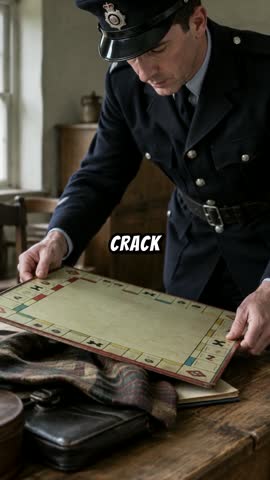
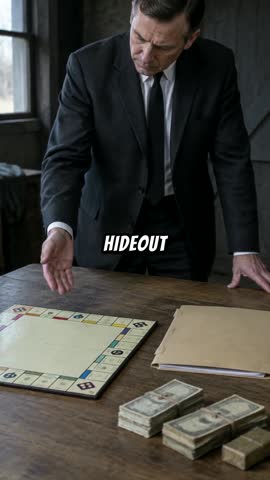
These frames come from the 70-second AI-illustrated Monopoly reference above. They are observations for drafting, not archival evidence or performance results.
Observe
Name the subject and one detail in the finished video.
Compare
Edit three directions and keep the right context.
Save
Copy your chosen caption or download the editing brief.
In this guide 8 sections
What this TikTok caption generator helps you write
TikTok caption generator scope: post text versus subtitles
The text beneath a post introduces the clip, adds context, or invites a response. This TikTok caption generator writes that text. It does not create timed subtitles or place words inside the video. Prepare any transcript separately.
Start the TikTok caption generator after watching the finished export. A script can describe a scene that was later removed. Name one detail a viewer can point to, such as the board game on the table.
The TikTok caption generator rearranges your words into three writing patterns. It does not call an AI model or research missing facts. A concrete observation gives you something useful to edit; “an amazing story” does not.
Treat the TikTok caption generator as a drafting desk. Change every output, compare directions, and copy or download your choice. Nothing is published automatically. Save before leaving because closing the tab discards the working session.
Follow the Monopoly video through the TikTok caption generator
Two observed moments, one defensible introduction
The reference is a completed 70-second export hosted by SI, using AI illustrations to retell a board-game clue story. This TikTok caption generator example describes the visible sequence; the pictures are not archival evidence.
At 00:02, an illustrated police officer examines a board game. At 00:45, a man gestures toward the board beside folders and bundles. Compare the captured frames below the TikTok caption generator with the full film.
Separate a proposed caption from a performance claim
Choose Load video example in the TikTok caption generator. The subject is “The Monopoly board clue.” The detail describes the board inside the hideout. The context says “AI-illustrated retelling, not archival footage.” Preserve that distinction.
The TikTok caption generator example has no engagement results attached. Its viewer question is an editorial proposal, not a tested winner. Watch the entire reference and independently verify any historical details you decide to add.
Give the TikTok caption generator a useful brief
TikTok caption generator inputs: name the subject
A subject should be recognizable in the film. In the TikTok caption generator, “The Monopoly board clue” identifies the object. “A shocking discovery” asks viewers to accept a reaction before learning what they are being shown.
Describe an action or relationship in the visible detail. The TikTok caption generator example follows the board inside a hideout. Avoid importing a dramatic claim from an earlier script when the final edit no longer establishes it.
The viewer question is optional in the TikTok caption generator. “Which ordinary object would you have noticed first?” connects with the image. Ask something the clip prepares viewers to answer, rather than starting an unrelated debate.
Leave uncertain facts out of the TikTok caption generator until checked. A date or attribution can sound authoritative beside a convincing illustration. The workshop cannot verify those details, even when the sentence reads smoothly.
Compare three TikTok caption generator openings
Subject first, detail first, or question first
Subject first names the topic before describing it. In the TikTok caption generator example, the board game gets immediate prominence. Choose this direction when viewers need a concrete label to understand a visually busy opening.
Detail first leads with the observed action, followed by your optional question. Choose it in the TikTok caption generator when the action explains more than a short label. Read that first sentence alone to check its clarity.
Question first opens with your supplied question. Without one, the TikTok caption generator offers an invitation instead. Remove that invitation when a straightforward description better fits your voice; not every post needs to ask something.
Edit each TikTok caption generator direction independently; switching keeps those edits. Changing the brief displays a reminder without overwriting drafts. Generate fresh drafts replaces them deliberately, and Undo last action restores the immediately previous version.
Keep the context beside the claim
Illustrations need accurate framing
The context field follows every TikTok caption generator starting direction. Here it identifies the visuals as an AI-illustrated retelling. Keep that line so investigative imagery is not presented as archival footage while the opening introduces the object.
TikTok requires labels for realistic AI-generated images, audio, and video, and provides a creator labeling setting. Review its current guidance and your actual upload settings. A draft sentence should not be assumed to complete every disclosure step. TikTok Help: AI-generated content
Keep TikTok caption generator context accurate to your own clip. Do not copy this disclosure onto differently produced footage. If a source credit needs more explanation, plan a clear destination for that information before publishing.
Use the TikTok caption generator to preserve checked wording, then inspect the exported text again. Manual edits can remove context as easily as they improve a sentence. Read as someone unfamiliar with your production process.
Review and save the TikTok caption generator output
Read the opening before expanding it
The TikTok caption generator preview shows the first 90 characters as a reading exercise, not a predicted truncation point. Expand it, then check the actual post composer on your intended device and account.
Before copying from the TikTok caption generator, compare the opening with the first scene. Does “this” identify something recognizable? Does the question make sense before the ending? Replace vague pronouns with concrete objects where needed.
Take the edited text with you
Copy caption and Download caption preserve the selected, edited text. Save editing brief keeps your inputs and all three options together. Send that file when an editor needs to understand why you chose an opening.
Clear all and Load video example replace the session; download important work first. Undo restores the immediately previous brief and drafts, not a complete history. Keep separately named files when a collaborator approves wording.
Review the TikTok caption generator draft before posting
Check the promise, the evidence, and the invitation
Watch the export with your TikTok caption generator draft beside it. Check every statement against the sequence, including anything added after generation. A polished introduction should not promise a reveal or source the film never supplies.
Hide the video and read only the TikTok caption generator output. The subject should remain recognizable and the question relevant. Check that context survived shortening. Preview punctuation, line breaks, and tags in the destination composer.
Save the selected TikTok caption generator text and editing brief. If you revise the video, review the caption again. A changed ending or removed scene can make a previously accurate sentence misleading; the film and introduction need to agree.
Sources you can check
Platform rules can change. Check the linked official guidance before your final upload.
Back to the caption workshop ↑ONE VIDEO, NEXT STEP