
MAKE THE SPOKEN STORY READABLE
YouTube Shorts captions: make every phrase readable
YouTube Shorts captions should carry the spoken meaning at a pace viewers can follow. Start with an actual illustrated reference, then apply the same checks to your own recording.
- Free to use
- No account needed
- SRT & VTT export
CAPTION READING LAB
Browser only · No uploadOpening study: four cues transcribed from the actual quiz-show reference, with approximate timing. Only 0–7.28 seconds are included. Review the audio before using this draft. This tool does not transcribe new audio or burn text into an MP4. Work stays in this tab; download before leaving.
Caption cues 4 / 100
Editing cue 1
Enter inserts a line break. Plain text only; 500 characters per cue. Keep punctuation and meaningful sound labels.
Preview & export ↓Paste an existing SRT track
Set the full duration first. Up to 100 cues; plain SRT without formatting. Import replaces this track; Undo restores it.
Observe the source, then improve the draft.
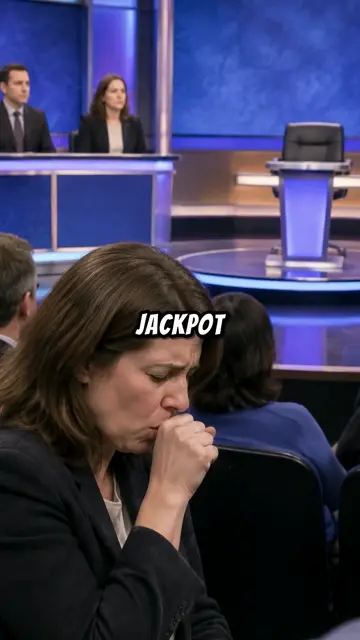
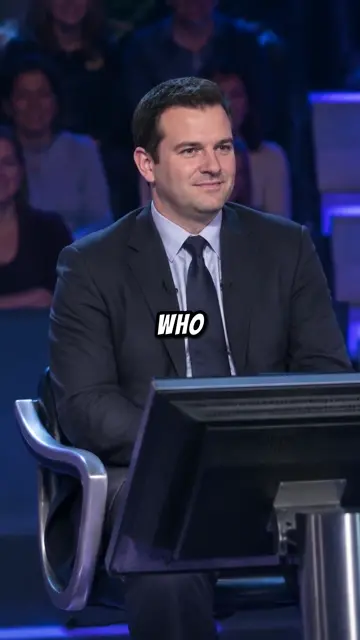
These are unaltered captures from the 69.97-second reference. Compare its isolated words with a complete phrase in the reading card. The study demonstrates editing decisions, not higher retention or a finished replacement video.
Observe
Compare the actual opening with the editable excerpt.
Correct
Review words, timing, phrase breaks, and reading pace.
Export
Save SRT or VTT, then inspect it against your final video.
In this guide 11 sections
YouTube Shorts captions: choose the right layer
Spoken words, rather than upload copy
Here, YouTube Shorts captions means text synchronized with speech and relevant sounds. Decide which problem you have before editing. YouTube Shorts captions should reproduce what a viewer hears.
There are two delivery choices for YouTube Shorts captions. A separate closed-caption track can be turned on or off by viewers. Burned-in words are pixels inside the exported video. Keep an editable source for each, and check that two simultaneous text layers do not cover the same important detail.
Study the actual opening before rewriting
Four cues from one completed reference
The reference above is a finished, 69.97-second AI-illustrated quiz-show story hosted by SI. Its opening uses isolated embedded words; the workshop offers a phrase-based draft for comparison. Compare YouTube Shorts captions without assuming the revision earns more views.
Our opening draft covers only 0–7.28 seconds. The first sentence is split after “collapsed,” followed by “because someone kept coughing.” Local speech recognition supplied approximate timing; compare it with the player before reuse. These YouTube Shorts captions are an editable study excerpt, not a complete accessibility track or a new video render.
YouTube Shorts captions: correct meaning first
Names, numbers, and missing sounds
Before making YouTube Shorts captions more colorful, verify the words. In this sample, check the spelling of Charles Ingram and the full show title. Fact-checking remains separate from matching YouTube Shorts captions to narration.
YouTube warns that automatic recognition can make mistakes and recommends reviewing its output. Treat YouTube Shorts captions as a draft until you have checked the complete soundtrack. Add a sound label when an audible event matters to understanding, but do not insert “[cough]” merely because the narrator mentions coughing. Read YouTube’s automatic-caption guidance.
Group words into readable phrases
Keep a thought together
Useful YouTube Shorts captions preserve the relationship between words. Compare “A quiz jackpot collapsed” with a card that stops after “A quiz.” A natural phrase boundary gives a viewer something complete to understand while the next image arrives.
The editor keeps deliberate line breaks. Try putting the show title on its own line, then compare the same cue at different sizes. YouTube Shorts captions should not split a name or leave a tiny final word stranded below a long line. If a phrase cannot fit comfortably, divide it into a new timed cue instead of making the type progressively smaller.
YouTube Shorts captions: align starts and endings
Read it at playback speed
An accurate sentence can still feel wrong when it appears too early or disappears before the speaker finishes. Use the reference player’s selected-cue control to compare the start and ending with the soundtrack. When reviewing YouTube Shorts captions, inspect the transition between two cues as carefully as each cue itself.
The workshop rejects negative times, reversed intervals, overlaps, and cues outside the supplied duration. Those checks protect file structure; they cannot hear whether YouTube Shorts captions match speech. Play YouTube Shorts captions continuously after individual timing fixes. See YouTube’s timing-editing instructions.
Check pace without chasing a magic score
Use the number as a review prompt
The reading card calculates characters per second from the text and cue duration. A 30-character phrase shown for two seconds measures 15 characters per second. This is an inspection aid for YouTube Shorts captions, not a prediction of retention or a platform ranking signal. Unfamiliar names in YouTube Shorts captions may need more reading time.
Our starting review prompts flag more than 20 characters per second, 42 characters on a line, or two lines. They are workshop preferences, not official YouTube Shorts captions limits. Keep a flagged cue when the real viewing test supports it, or split it when reading feels rushed.
YouTube Shorts captions: compare size and contrast
Readable at the size people actually watch
The preview uses system sans-serif type with white or yellow on charcoal. Preview pixels describe this reading card, not a promised size in YouTube’s player. Review YouTube Shorts captions on a phone as well as a desktop: a phrase that looks comfortable beside an editor can look crowded over a small moving image.
For burned-in YouTube Shorts captions, use your video editor to test placement over the actual shot. Avoid covering faces, objects being explained, and app controls. The card here is deliberately separate from the reference’s existing embedded words; it does not simulate YouTube’s interface or guarantee a universal safe area.
Save words and timing in the right format
An editable file is not a rendered movie
Download SRT for a basic subtitle file, or VTT for a compatible timed-text workflow. The card’s colors and font size stay in the browser. YouTube Shorts captions saved as basic SRT do not carry styling into YouTube, so keep visual design decisions in the video-editing project when you need a specific appearance. Check YouTube’s supported caption formats.
The example filename includes “opening-excerpt” because most of the reference remains uncaptioned by this exercise. Complete the entire recording before treating YouTube Shorts captions as an accessibility deliverable. Reimport your saved SRT to check the handoff, retain a backup, and verify accents and punctuation.
Add the completed track to the correct video
Choose the language and inspect the result
For a separate track, open YouTube Studio’s Subtitles section, choose the intended video and language, and add the caption file with timing. YouTube Shorts captions belong to a particular version of a video: if you cut five seconds from the beginning afterward, the original timestamps will no longer align correctly. Follow YouTube’s caption-upload steps.
Check that the exported text belongs to the soundtrack you uploaded. Then inspect YouTube Shorts captions with caption display enabled, including the first cue and the final spoken sentence. Inspect YouTube Shorts captions before publishing the track.
YouTube Shorts captions: solve the specific failure
Different symptoms need different fixes
If words are wrong, correct the transcript. If words are correct but late, adjust the timestamps. If YouTube Shorts captions are absent after upload, first distinguish a separate track from text you expected to burn into the picture. Automatic captions may take time to become available.
If text is already baked into a video, a subtitle-file edit cannot remove it; return to the original editing project. If an imported SRT fails here, check the duration, arrow separators, sequential timing, and blank lines between cues. Keep the original file while correcting YouTube Shorts captions. Undo restores the prior track after an import or reset, and a failed import leaves existing work intact. Test YouTube Shorts captions again after each repair.
Review the complete experience before publishing
One uninterrupted pass with sound, then without
Finish YouTube Shorts captions with two passes. With sound on, check accuracy and synchronization. With sound off, check whether the text conveys the spoken information and essential sounds. Watch continuously instead of stopping after every phrase.
Download the edited file before closing the tab. Good YouTube Shorts captions make the actual recording understandable; they do not repair unsupported claims or guarantee search traffic. Keep your YouTube Shorts captions with the matching video revision.
Sources you can check
- YouTube Help: add subtitles and captions ↗
- YouTube Help: review automatic captions ↗
- YouTube Help: edit caption words and timing ↗
- YouTube Help: supported subtitle file formats ↗
Platform rules can change. Check the linked official guidance before your final upload.
Back to the caption lab ↑ONE VIDEO, NEXT STEP